This page details month-end accounting information and deadlines for UW–Madison.
Accounting journals
All manual accounting journals for the current month need to be fully approved by end of the second business day of the following month.
If accounting journals are not fully approved by business day 2 of the following month, the accounting date on the journal will be changed to the first day of the following month (i.e. original journal date 7/15/26, accounting date updated to 8/1/26). This includes both journals that are “In Progress” and “Created” status. Once the accounting date is changed, this will restart the workflow for approvals on the journal.
This is an accordion element with a series of buttons that open and close related content panels.
Finding "In Progress" accounting journals to approve
Communication will be sent out by Business Services four or five days before the last day of the month for all accounting journals that are “In Progress” status to employees next up to approve. If you receive this email, an accounting journal should be in your My Task to review and approve.
There are two ways find an accounting journal and see who it is with for approval:
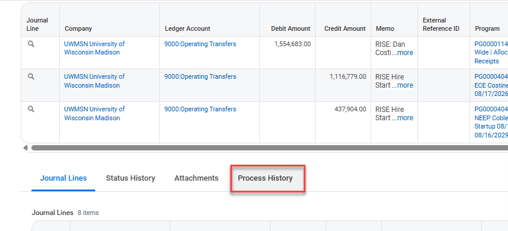
- Enter the journal ID in the search bar and click on the journal ID. Scroll down to the “Process History” tab to see who the journal is currently with for approval.
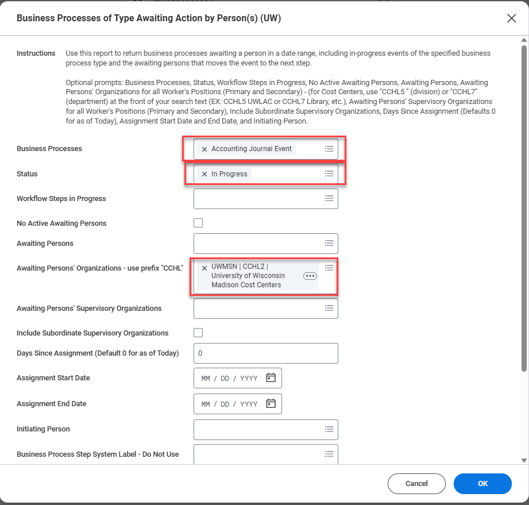
- Run the report “Business Processes of Type Awaiting Action by Person(s) (UW)” with these filters:
- Business Processes: Accounting Journal Event
- Status: In Progress
- Awaiting Persons’ Organizations – use prefix “CCHL”: UWMSN | CCHL2 | University of Wisconsin Madison Cost Centers
Finding "Created" accounting journals
To find any accounting journal in “Created” status that you created but did not submit for approval, run the report “Find Journals (UW)” with:
- Year and Period: Current year and period (month)
- Status: Created
- Originated By: Your name if searching for your own created journals
- Journal Sources: Only include journal sources used for manual accounting journals. These could include: Manual Journal, Manual Journal Transfers Only, Manual Journal Internal Chargeback, Non-Salary Cost Transfer (or other grant related journal sources).

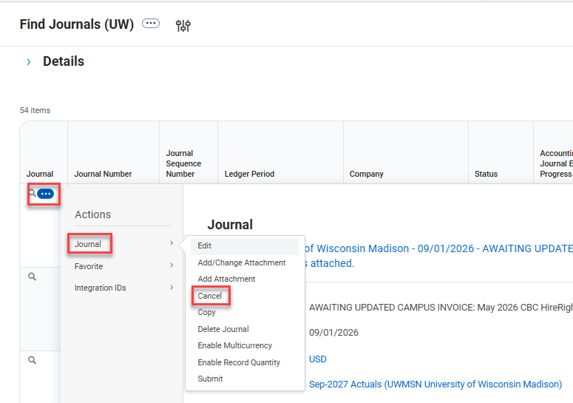
If the journal is no longer needed, you can click into the related actions next to the journal ID and select “Cancel.”
Month-end allocations and entries
Entries and allocations recorded during period close to accurately account for charges such as terminal leave and manual accounts receivable.
This is an accordion element with a series of buttons that open and close related content panels.
Terminal leave allocation
Terminal leave allocation is recorded business day 3 of the next month on the previous month’s payroll charges.
More information on terminal leave allocation and rates are on the Understanding Fringe Expenses and Terminal Leave Allocation Charges web page.
Manual Accounts Receivable
Divisions who manually record their accounts receivable submit this request through Workday at the end of each month. The Division of Business Services records these entries in Workday.
All requests should be submitted by the morning of the third day of the next month (business day 3).
Operational transaction month-end deadlines
Operational transactions related to Expenses, Procurement, ISD, Supplier Invoices, and Payroll Accounting Adjustments will automatically switch their accounting date to the next month early morning on business day 1.
Customer Invoices, Cash Sales, and Ad Hoc Bank Transactions can continue to be entered through end of business day 2.
Accounting adjustments must be fully approved by the end of business day 2 to have the transaction post to the period.
Month-end timetable
The goal is to close the monthly books by the end of the business day 4. Below is a table showing when all accounting journals should be fully approved and the day the books should close for each month-end. These dates are subject to change; any changes will be communicated via email from Business Services.
An email is sent out each month when the books are closed for the month. Anyone who would like to receive this email can contact finaccounting@bussvc.wisc.edu.
Fiscal year 2027 (FY27) month-end timetable
| Month | Last Day of Month | Accounting Journals Fully Approve by EOD | Anticipated month closed |
|---|---|---|---|
| Jul-27 | 7/30/26 (Thursday) | 8/4/26 (Tuesday) | 8/6/26 (Thursday) |
| Aug-27 | 8/31/26 (Friday) | 9/2/26 (Wednesday) | 9/4/26 (Friday) |
| Sep-27 | 9/30/26 (Thursday) | 10/2/26 (Friday) | 10/6/26 (Tuesday) |
| Oct-27 | 10/30/26 (Friday) | 11/3/26 (Tuesday) | 11/5/26 (Thursday) |
| Nov-27 | 11/30/26 (Monday) | 12/2/26 (Wednesday) | 12/4/26 (Friday) |
| Dec-27 | 12/30/26 (Wednesday – Holiday 12/31/26) | 1/5/27 (Tuesday) | 1/7/27 (Thursday) |
| Jan-27 | 1/29/27 (Friday) | 2/2/27 (Tuesday) | 2/4/27 (Thursday) |
| Feb-27 | 2/26/27 (Friday) | 3/2/27 (Tuesday) | 3/4/27 (Thursday) |
| Mar-27 | 3/31/27 (Wednesday) | 4/2/27 (Friday) | 4/6/27 (Tuesday) |
| Apr-27 | 4/30/27 (Friday) | 5/4/27 (Tuesday) | 5/6/27 (Thursday) |
| May-27 | 5/28/27 (Friday – Holiday 5/31/27) | 6/2/27 (Wednesday) | 6/4/27 (Friday) |
| Jun-27 | 6/30/27 (Wednesday) | Dates communicated out on Year-End Accounting page | Dates communicated out on Year-End Accounting page |
